Client Portfolio Position
How to follow this chapter
Inputs: userId, portfolioId and a CLIENT token from the earlier steps.
Steps and expected result: List portfolios, select one, then retrieve its snapshot and associated data. Download the document selected from metadata using its returned reference and portfolio ID.
Alternative or later actions: Values, cash accounts and documents can arrive asynchronously. An empty list or unavailable data can occur before portfolio processing completes.
DTO source: BankAccountTypeOutputModel, BookingCodeOutputModel, CashAccountMovementOutputModel, CashAccountOutputModel, PortfolioOutputModel, PortfolioValuesContainerOutputModel, UserBankDocumentInfoOutputModel
Variables assigned in an earlier block are reused by later blocks. Client-entered values come from your UI; keep identifiers and lookup results in the current client context. Do not create a fresh context between steps.
Portfolios list
Action: Read the current portfolio list using Snapshot.
Keep / expected result: Keep the portfolioId selected by the client.
httpClient.DefaultRequestHeaders.Authorization = new AuthenticationHeaderValue("Bearer", accessToken);
// Assuming this is our client ID
// Use the userId returned by registration.
var clientPortfolios = await httpClient.GetFromJsonAsync<IList<PortfolioOutputModel>>($"api/v1/user-portfolios/user-id/{userId}?portfolio-view-as=Snapshot");
// Assuming this is our client ID
// Use the userId returned by registration.

HttpRequest portfolioRequest = HttpRequest.newBuilder()
    .timeout(Duration.ofMinutes(1))
    .uri(Settings.wmsUri("user-portfolios/user-id/" + userId + "?portfolio-view-as=Snapshot"))
    .header("Accept-Language", "de-DE")
    .header("Authorization", "Bearer " + accessToken)
    .header("Content-Type", "application/json")
    .build();

var response = httpClient.send(portfolioRequest, BodyHandlers.ofString());
Api.requireSuccess(response);

Type listType = new TypeToken<ArrayList<PortfolioOutputModel>>(){}.getType();
List<PortfolioOutputModel> portfolioObjs = new Gson().fromJson(response.body(), listType);
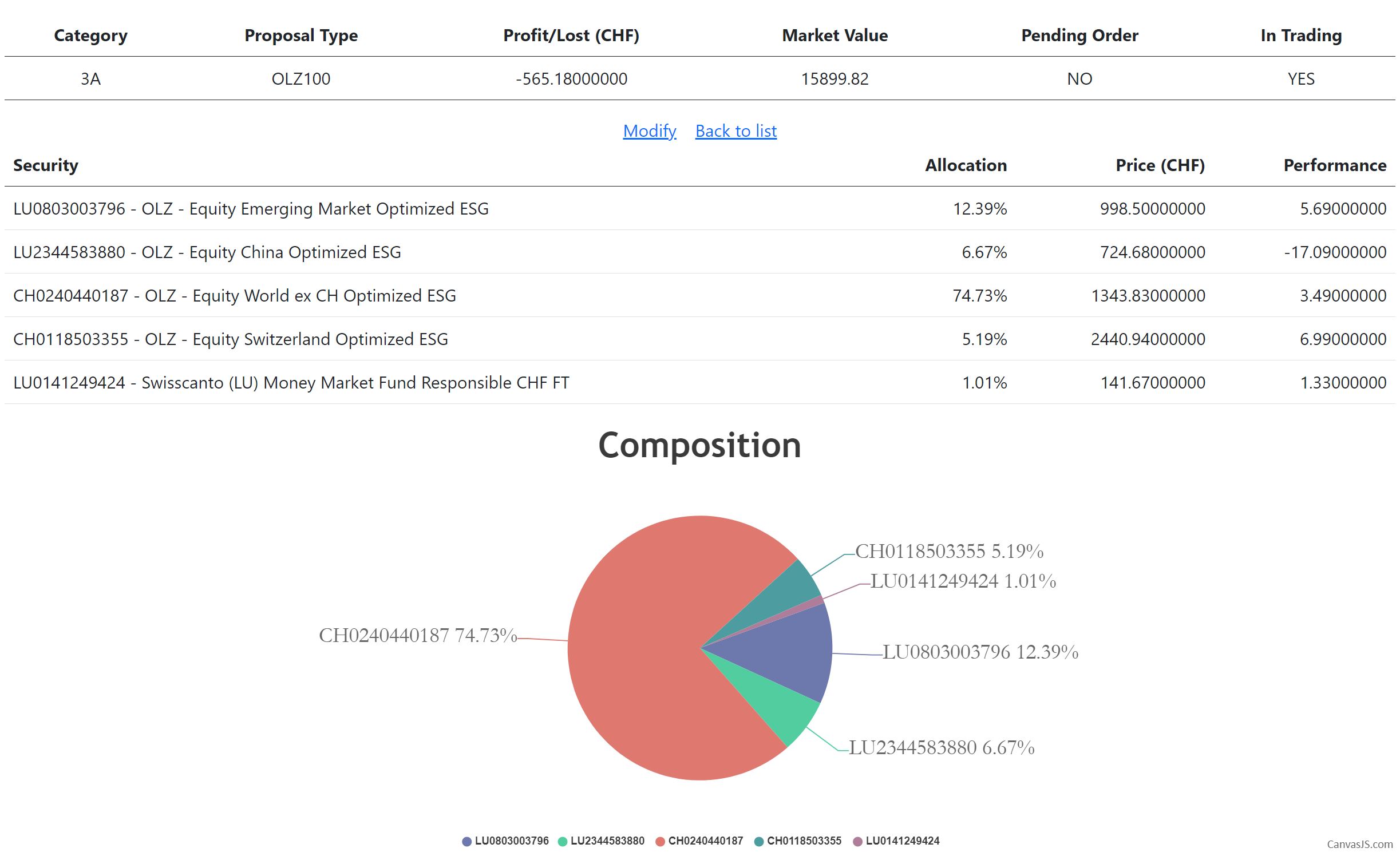
Portfolio by Id
Action: Read the current portfolio snapshot.
Keep / expected result: Use the returned state and HasPendingOrder when presenting available actions.
// Assuming this is the portfolio ID
// portfolioId is selected from the returned client portfolio list.
var clientPortfolio = await httpClient.GetFromJsonAsync<PortfolioOutputModel>($"api/v1/user-portfolios/portfolio-id/{portfolioId}?portfolio-view-as=Snapshot");
// Assuming this is the portfolio ID
// portfolioId is selected from the returned client portfolio list.

HttpRequest portfolioRequest = HttpRequest.newBuilder()
    .timeout(Duration.ofMinutes(1))
    .uri(Settings.wmsUri("user-portfolios/portfolio-id/" + portfolioId + "?portfolio-view-as=Snapshot"))
    .header("Accept-Language", "de-DE")
    .header("Authorization", "Bearer " + accessToken)
    .header("Content-Type", "application/json")
    .build();

response = httpClient.send(portfolioRequest, BodyHandlers.ofString());
Api.requireSuccess(response);
PortfolioOutputModel portfolioObj = new Gson().fromJson(response.body(), PortfolioOutputModel.class);
Portfolio values
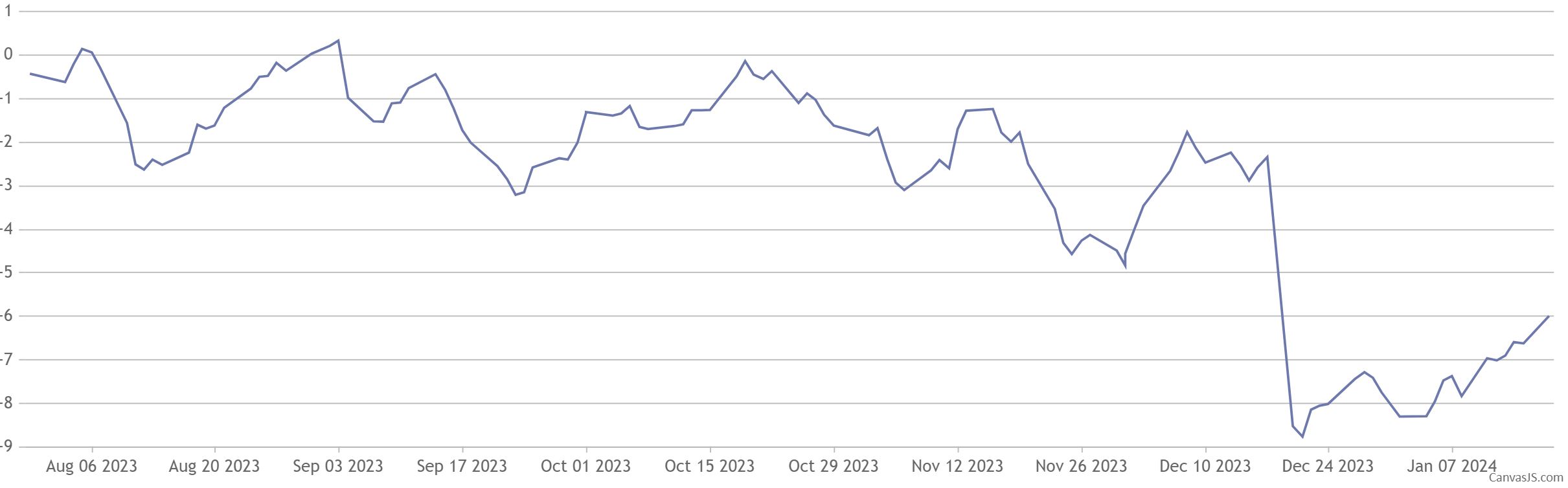
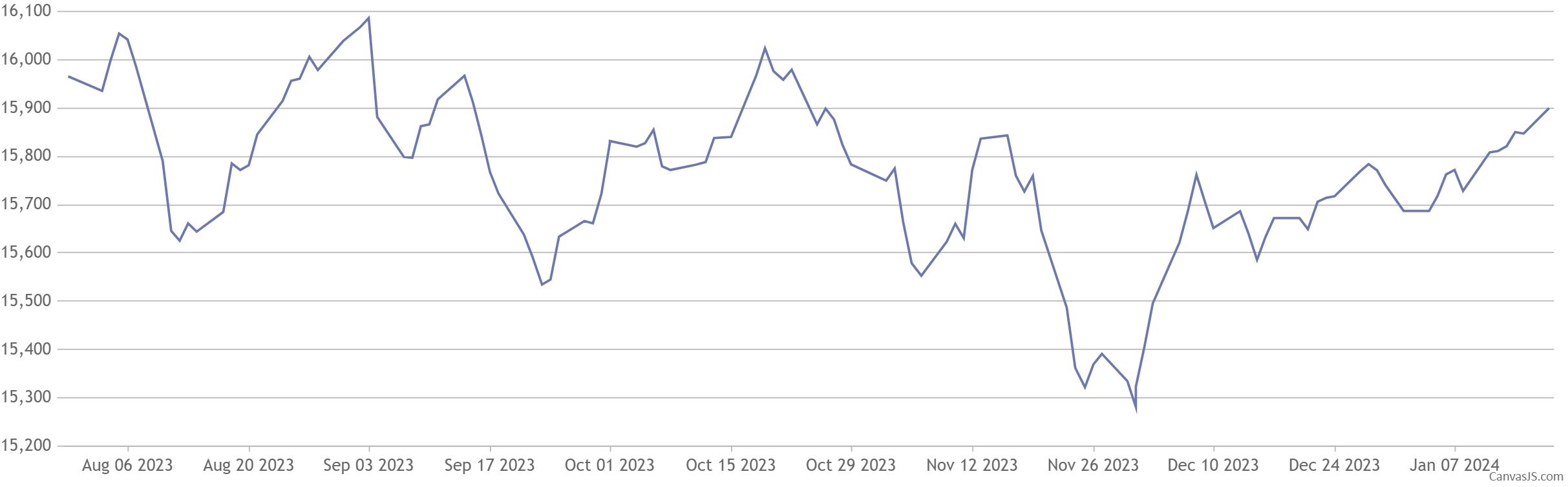
Action: Read the performance/value container.
Keep / expected result: Read its Values collection; no data may yet be available for the requested period.
// Assuming this is the portfolio ID we want to display
// portfolioId is selected from the returned client portfolio list.
var portfolioValues = await httpClient.GetFromJsonAsync<PortfolioValuesContainerOutputModel>($"api/v1/user-portfolios/portfolio-id/{portfolioId}/performances");
// Assuming this is the portfolio ID we want to display
// Use the same selected portfolioId.

HttpRequest portfolioPerformanceRequest = HttpRequest.newBuilder()
    .timeout(Duration.ofMinutes(1))
    .uri(Settings.wmsUri("user-portfolios/portfolio-id/" + portfolioId + "/performances"))
    .header("Accept-Language", "de-DE")
    .header("Authorization", "Bearer " + accessToken)
    .header("Content-Type", "application/json")
    .build();

response = httpClient.send(portfolioPerformanceRequest, BodyHandlers.ofString());
Api.requireSuccess(response);
PortfolioValuesContainerOutputModel portfolioPerformanceObj = new Gson().fromJson(response.body(), PortfolioValuesContainerOutputModel.class);
Portfolio cash amount
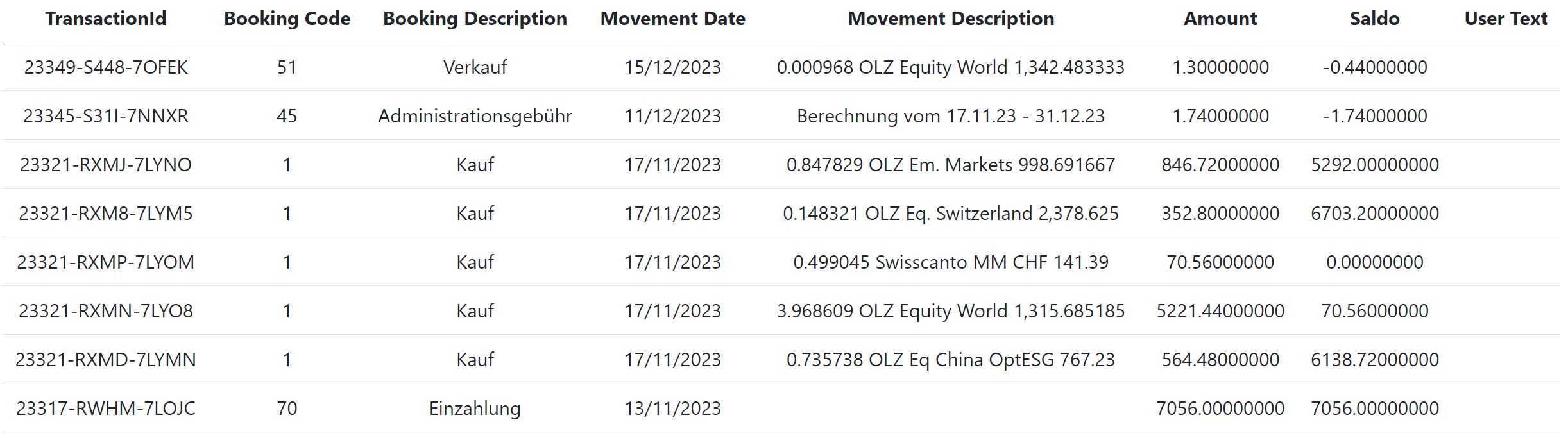
Action: Find the associated cash account and read its balance and movements.
Keep / expected result: Keep the relevant cash-account ID; display the balance together with its date.
// Get bank account types: Cash account/Custody account
var bankAccountTypes = await httpClient.GetFromJsonAsync<List<BankAccountTypeOutputModel>>($"api/v1/cash-account-types");
var cashAccountType = bankAccountTypes.First(x => x.Code == "CASH-ACCOUNT");
// Get portfolio's bank accounts
var bankAccounts = await httpClient.GetFromJsonAsync<List<CashAccountOutputModel>>($"api/v1/user-cash-accounts/portfolio-id/{portfolioId}");
var cashAccount = bankAccounts.First(x => x.AccountTypeId == cashAccountType.Id);
// Portfolio cash amount

HttpRequest bankAccountTypesRequest = HttpRequest.newBuilder()
    .timeout(Duration.ofMinutes(1))
    .uri(Settings.wmsUri("cash-account-types"))
    .header("Accept-Language", "de-DE")
    .header("Authorization", "Bearer " + Settings.GUEST_TOKEN)
    .header("Content-Type", "application/json")
    .build();

// Get bank account types: Cash account/Custody account
response = httpClient.send(bankAccountTypesRequest, BodyHandlers.ofString());
Api.requireSuccess(response);
Type listBankAccountTypes = new TypeToken<ArrayList<BankAccountTypeOutputModel>>(){}.getType();
List<BankAccountTypeOutputModel> bankAccountTypes = new Gson().fromJson(response.body(), listBankAccountTypes);
var bankAccountType = bankAccountTypes.stream().filter(x -> "CASH-ACCOUNT".equals(x.Code)).findFirst().orElseThrow(() -> new IllegalStateException("Required reference data is unavailable"));

// Get portfolio's bank accounts
HttpRequest portfolioBankAccountRequest = HttpRequest.newBuilder()
    .timeout(Duration.ofMinutes(1))
    .uri(Settings.wmsUri("user-cash-accounts/portfolio-id/" + portfolioId))
    .header("Accept-Language", "de-DE")
    .header("Authorization", "Bearer " + accessToken)
    .header("Content-Type", "application/json")
    .build();

response = httpClient.send(portfolioBankAccountRequest, BodyHandlers.ofString());
Api.requireSuccess(response);
Type cashAccountType = new TypeToken<ArrayList<CashAccountOutputModel>>(){}.getType();
List<CashAccountOutputModel> cashAccountObjs = new Gson().fromJson(response.body(), cashAccountType);
CashAccountOutputModel cashAccountObj = cashAccountObjs.stream().filter(x -> Objects.equals(x.AccountTypeId, bankAccountType.Id)).findFirst().orElseThrow(() -> new IllegalStateException("Required reference data is unavailable"));
var bankAccountMovements = await httpClient.GetFromJsonAsync<List<CashAccountMovementOutputModel>>($"api/v1/user-cash-accounts/cash-account-id/{cashAccount.Id}/movements");
HttpRequest cashAccountMovementsRequest = HttpRequest.newBuilder()
    .timeout(Duration.ofMinutes(1))
    .uri(Settings.wmsUri("user-cash-accounts/cash-account-id/" + cashAccountObj.Id + "/movements"))
    .header("Accept-Language", "de-DE")
    .header("Authorization", "Bearer " + accessToken)
    .header("Content-Type", "application/json")
    .build();

response = httpClient.send(cashAccountMovementsRequest, BodyHandlers.ofString());
Api.requireSuccess(response);
Type cashAccountMovementType = new TypeToken<ArrayList<CashAccountMovementOutputModel>>(){}.getType();
List<CashAccountMovementOutputModel> cashAccountMovementObjs = new Gson().fromJson(response.body(), cashAccountMovementType);
foreach (var bankAccountMovement in bankAccountMovements)
{
    var bookingCode = await httpClient.GetFromJsonAsync<BookingCodeOutputModel>($"api/v1/booking-codes/id/{bankAccountMovement.BookingCodeId}");
    var bookingCodeValue = bookingCode.Code;
    var bookingCodeDescription = bookingCode.Description;
// Continue with the data returned by the API.
}
HttpRequest bookingCodeRequest = HttpRequest.newBuilder()
    .timeout(Duration.ofMinutes(1))
    .uri(Settings.wmsUri("booking-codes"))
    .header("Accept-Language", "de-DE")
    .header("Authorization", "Bearer " + accessToken)
    .header("Content-Type", "application/json")
    .build();

response = httpClient.send(bookingCodeRequest, BodyHandlers.ofString());
Api.requireSuccess(response);
Type bookingCodeTypes = new TypeToken<ArrayList<BookingCodeOutputModel>>(){}.getType();
List<BookingCodeOutputModel> bookingCodeTypeObjs = new Gson().fromJson(response.body(), bookingCodeTypes);

cashAccountMovementObjs.forEach(bankAccountMovement -> {
    BookingCodeOutputModel bookingCodeTypeObj = bookingCodeTypeObjs.stream().filter(x -> Objects.equals(x.Id, bankAccountMovement.BookingCodeId)).findFirst().orElseThrow(() -> new IllegalStateException("Required reference data is unavailable"));

    var bookingCode = bookingCodeTypeObj.Code;
    var bookingCodeDescription = bookingCodeTypeObj.Description;
    // Continue with the data returned by the API.
});
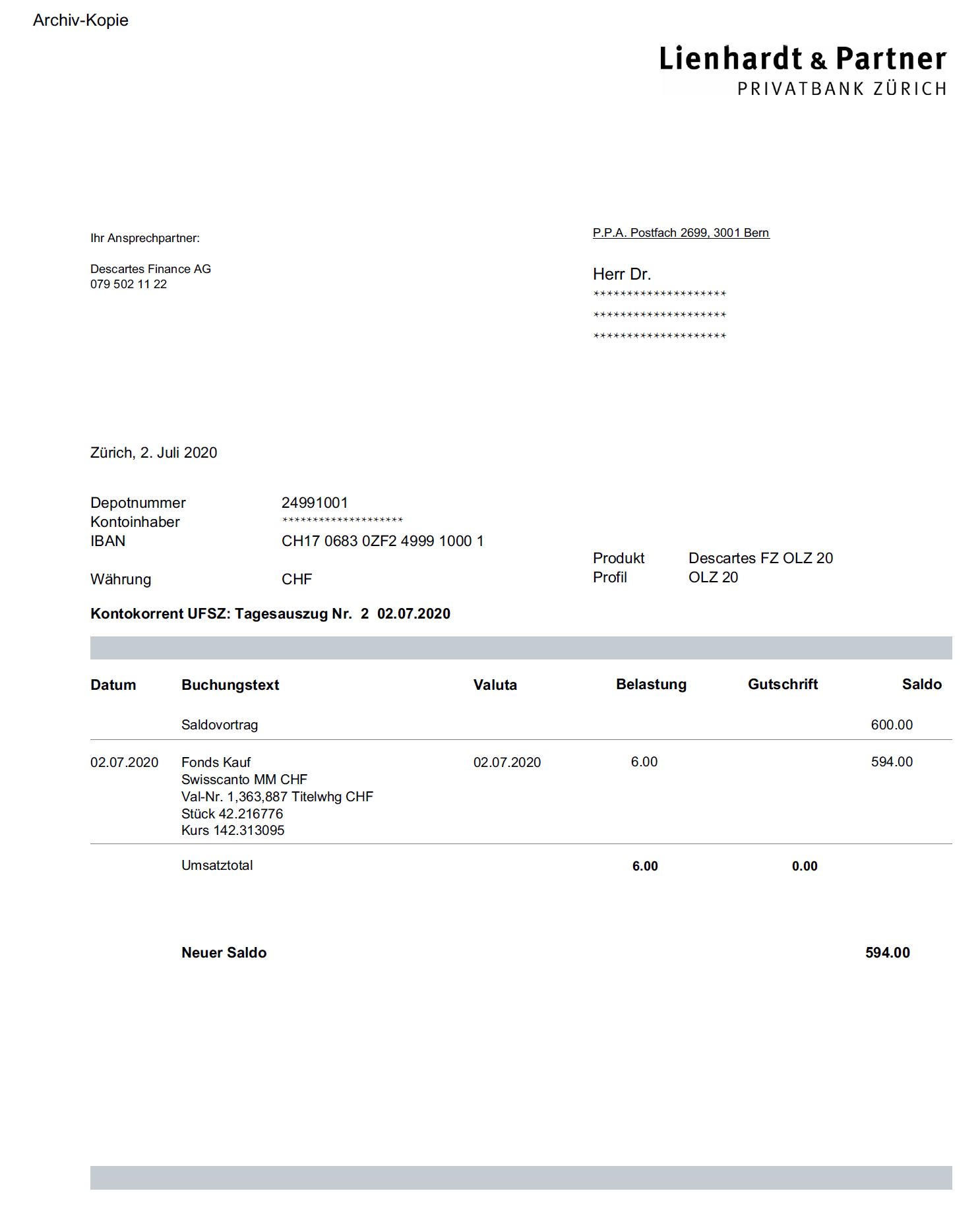
Portfolio bank documents
Action: List documents and download the selected binary PDF.
Keep / expected result: Use the metadata UserPortfolioId and Reference for the download, rather than assuming the current portfolio owns every document.
// User bank documents
var url = $"api/v1/user-bank-documents/user-id/{userId}/list?starting-from=20000101";
var bankDocumentsForAllPortfolios = await httpClient.GetFromJsonAsync<IList<UserBankDocumentInfoOutputModel>>(url);
// User bank documents
HttpRequest userDocumentsMetadataRequest = HttpRequest.newBuilder()
    .timeout(Duration.ofMinutes(1))
    .uri(Settings.wmsUri("user-bank-documents/user-id/" + userId + "/list?starting-from=20000101"))
    .header("Accept-Language", "de-DE")
    .header("Authorization", "Bearer " + accessToken)
    .header("Content-Type", "application/json")
    .build();

response = httpClient.send(userDocumentsMetadataRequest, BodyHandlers.ofString());
Api.requireSuccess(response);
Type userBankDocumentInfoType = new TypeToken<ArrayList<UserBankDocumentInfoOutputModel>>(){}.getType();
List<UserBankDocumentInfoOutputModel> userDocumentsMetadataObjs = new Gson().fromJson(response.body(), userBankDocumentInfoType);
// selectedDocumentId identifies an item chosen from the returned metadata.
var selectedDocument = bankDocumentsForAllPortfolios.Single(x => x.Id == selectedDocumentId);
var documentPortfolioId = selectedDocument.UserPortfolioId;
var reference = selectedDocument.Reference;
var url = $"api/v1/user-bank-documents/user-id/{userId}/portfolio-id/{documentPortfolioId}/download-bank-document/reference/{Uri.EscapeDataString(reference)}";
using var downloadResponse = await httpClient.GetAsync(url);
downloadResponse.EnsureSuccessStatusCode();
var documentContentType = downloadResponse.Content.Headers.ContentType?.MediaType;
var byteArray = await downloadResponse.Content.ReadAsByteArrayAsync();
// Use documentContentType when saving or displaying the downloaded document.
// selectedDocumentId identifies an item chosen from the returned metadata.
var selectedDocument = userDocumentsMetadataObjs.stream()
    .filter(x -> Objects.equals(x.Id, selectedDocumentId)).findFirst()
    .orElseThrow(() -> new IllegalArgumentException("Select a listed document"));
var documentPortfolioId = selectedDocument.UserPortfolioId;
var reference = selectedDocument.Reference;
var encodedReference = java.net.URLEncoder.encode(reference, StandardCharsets.UTF_8).replace("+", "%20");
HttpRequest request = HttpRequest.newBuilder()
    .timeout(Duration.ofMinutes(1))
    .uri(Settings.wmsUri("user-bank-documents/user-id/" + userId
        + "/portfolio-id/" + documentPortfolioId + "/download-bank-document/reference/" + encodedReference))
    .header("Authorization", "Bearer " + accessToken).GET().build();
var response = httpClient.send(request, BodyHandlers.ofByteArray());
Api.requireSuccess(response);
var documentContentType = response.headers().firstValue("Content-Type").orElse("application/octet-stream");
byte[] documentBytes = response.body();
// Use documentContentType when saving or displaying documentBytes.